
All free toolsFree tool · Identity
What can the apps in your tenant actually access?
Audit every app registration and enterprise app by what its permissions can do, plus expired credentials, unused apps and owners.
- Entra App Registration Audit
- Output: HTML and Excel report
- Free, no trial or account needed
Check your inbox
The link is on its way
We sent the download link to . It works for 7 days. Can’t find it? Check your junk folder.
While you wait: see Griffin31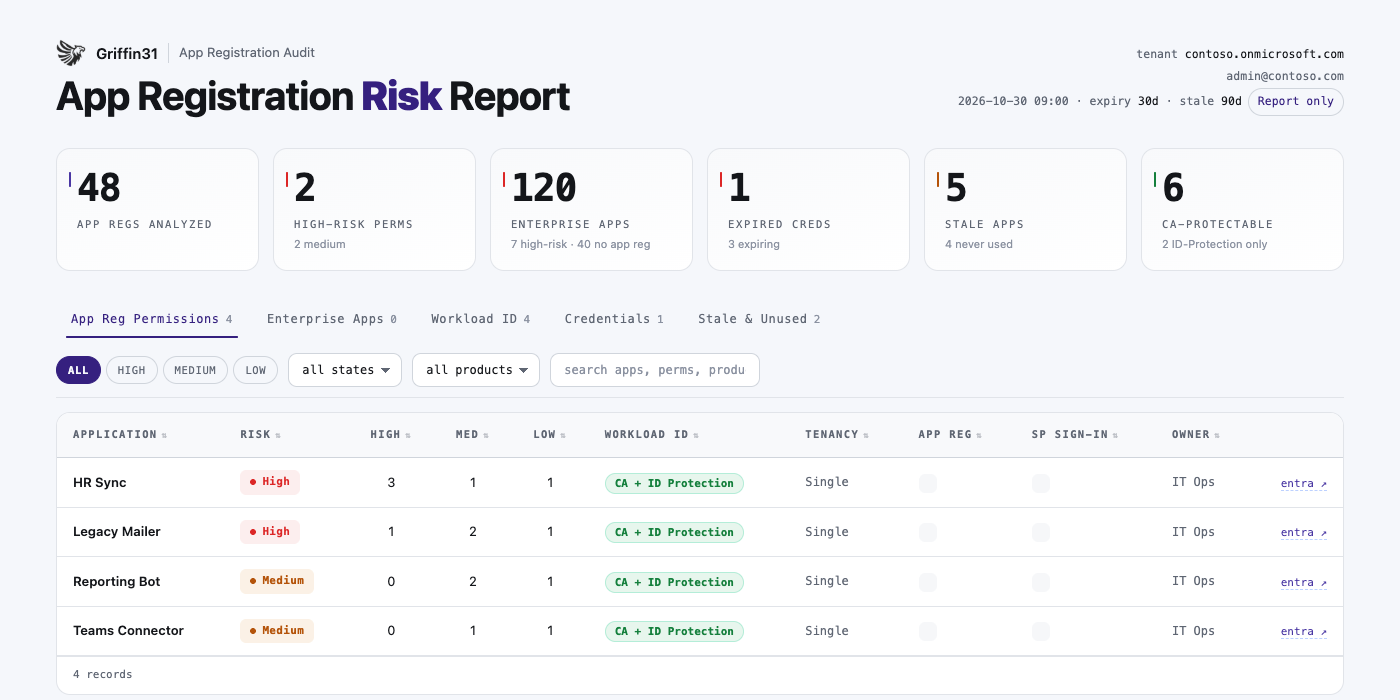
Example report with sample data.
What it finds
- Every permission rated High, Medium or Low by what it can actually do
- Third-party apps your users consented to, the top consent-phishing risk
- Expired and expiring certificates and secrets
- Apps unused for 90 days or never used, across every sign-in type
- Owners, and which apps you can protect with Conditional Access for workload identities
Why it matters
Expiry and staleness checks don’t answer the real question: what can this app reach? An unused app that still holds tenant-wide permissions is an open door.
How it works
- 01Get the toolLeave your details and we email you the download link. Review the script before you run it.
- 02Run itOpen PowerShell 7 and run entra-appregistration-audit.ps1. Sign in with an admin account when asked.
- 03Open the reportAn interactive HTML report and an Excel workbook, with a link to each app in Entra.
- 04Fix what mattersStart with the highest-risk items. Need help? Book a call with our team.
Requirements
- PowerShell 7 (Windows or macOS)
- Microsoft Graph and ImportExcel modules (install automatically)
- Read permissions: Application.Read.All, Directory.Read.All, AuditLog.Read.All
- Entra ID P1 or P2 for sign-in activity (optional)
What it can touch
Read-only by default. Clean-up actions (remove a credential, disable or delete an app) only run if you choose them and type a confirmation.
Griffin31
This tool checks one area. Griffin31 checks your whole tenant.
More than 370 Microsoft 365 security settings, the evidence behind every result, what to fix first, and an email when a setting slips back.